Wednesday, February 27, 2008
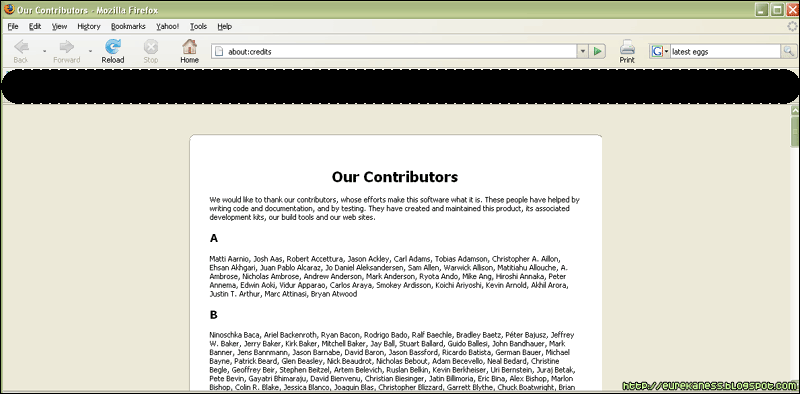
Do you want to know who the people behind Mozilla Firefox are?
Well, here's the trick:
1. Open Firefox
2. In the address bar, type "About:Credits" without the quotes
3. Press ENTER
Voila! A list of those geniuses behind everyone's favorite browser is displayed.
Labels: Browser, Firefox, Secrets, Tricks

Friday, December 7, 2007
Yes, this might sound too common sense-ical for you, but did you know that Google actually has the answer if you search for the number of horns on a unicorn?
I'm not exactly sure how the Google Calculator computes for the results. If you enter all other dumb phrases (like "number of alphabets" or the "number of fingers on your right hand"), Google doesn't have the answer for it. But if you enter phrases like:
"
Number of months in a year"
or
"
number of centimeters in a meter"
and even
"
number of horns on a unicorn"
Google has answers for those. Cool eh?
Labels: Cool Stuff, Google, Secrets, Tricks, What's Hot
Saturday, November 24, 2007
Wow! It has been more than a month since I last posted here! My apologies for being too busy to update this blog. Work has been insane, and business trips make things even crazier. Anyway, here I am with a new treat for all of you, today: The MS Paint Magic.
We all underestimate the power of MS Paint. After all, there's Adobe Photoshop and Imageready, or Corel Draw to answer our basic picture editing needs. But what we don't know is that our often-taken-for-granted picture editor also has tricks up its sleeve. Let me show you what it's capable of.
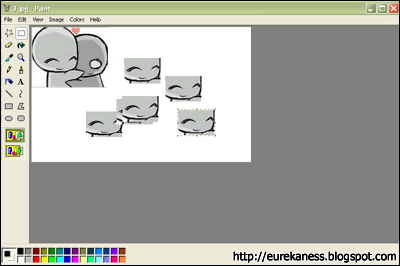
1. Stamp Function. MS Paint is capable of capturing part of an object and pasting it multiple times on the image. To do this, simple follow theaw steps:
- Select which part of the image you want to stamp
- Press and hold the CTRL Key, and drag to where you want to stamp the image part
- Click on the area
You will get something like this:
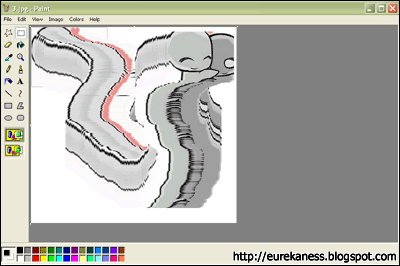
2. Image Scuffing. MS Paint is also able to scuff images. To do this, simply follow these steps:
- Select which part of the image you want to scuff
- Press and hold the SHIFT Key, and drag to make the patterns
You will get something like this:
Cool, huh?
Source: http://www.eeggs.com/items/48789.htmlLabels: Cool Stuff, Discovery, MS Paint, Tricks
Friday, September 21, 2007
Author's Note: Wow, it's been some time since my last post. Sorry mates, I've been busy with work that I have neglected my blogs for a few days. But now, I'm back with new stuff that you'll definitely find interesting!
Did you know that you can actually create a log file using Windows Notepad without having to do coding, scripting, or all that programming thingamagigs software developers do? Here's how:
1. Open
Notepad 2. Type
.LOG on the first line, and then press
[Enter] to move to the next line
3. Save your file on a directory you can easily navigate to.
The next time you open the file, you will notice that the current date and time have been appended to the end of the text you entered.
Sweet eh?
Source: http://support.microsoft.com/kb/260563Labels: Notepad, Secrets, Tricks
Tuesday, September 4, 2007
Did you know that you cannot create a blank folder in Windows?
If you rename it to [BLANK] (that is, delete the
Folder Name), Windows will automatically rename it back to the
Folder Name.
Even if you rename it to (' ') SPACE, Windows will still rename it back to its
Folder Name.
But! Here's a technique I'll share with you on how to rename your folder to blank:
- Highlight the folder you want to rename
- Press F2, or Right-click > Rename
- Hold [ALT]
- Press the number keys: [2] [5] [5]
And you'll get a blank to use for your folder!An alternative for this is also using [ALT] + 0160.Why is that? Well, learn your Ascii, my friend!
Labels: Secrets, Tricks, Trivia, Windows
Thursday, August 23, 2007
For all you torrent-noobs out there, my good friend
Paulo has discovered that you can actually download files through torrent without a client (Meaning, no uTorrent, no Azureus, etc).
Just go to this site:
BITLETAnd paste the URL of the torrent metafile on the textbox
Then click "Download Torrent"

And you're done!
P.S. This is for BOK and for my dad, who are clueless about downloading via torrents.Labels: Torrent, Tricks, What's Hot
Wednesday, August 1, 2007
Did you know that Windows XP has a hidden utility for editing fonts and/or icons? Well, let's face it. We don't really maximize all the utilities that Windows gives us, we only usually run those apps that we know exist. Anyway, Windows provides us with this powerful application that allows us to create icons, fonts, and even logos!
Behold the EUDCEDIT.
To access this program, do the following:
- Go to Start > Run
- Type eudcedit. Press Enter.
You get this:
 Source: http://www.asnee.com/blog/?p=595
Labels: Secrets, Tricks, Windows
Thursday, July 26, 2007
We have all come to love torrents. And for me, probably the best BitTorrent client is
µTorrent (also known as microTorrent). Why? Because: 1) it's freeware; 2) it uses minimum computer resources -- only 213KB total in size; 3) it offers the same functionalities as other powerful Java-based clients such as Azureus and BitComet.
Recently, I was reading about how "hidden pictures" can be obtained just by clicking like crazy on the About page of any application. So I tried doing it on most of the applications I'm running. And uTorrent was one of them.
Here's what I've found out:
- Open the uTorrent application
- Select the menu Help > About
- Press [T]
And a tetris game begins!

Also, if you click on the logo, music will be played. Hehehe, this is what you get for tinkering with your applications, especially when bored. =P
Labels: Torrent, Tricks
Tuesday, July 24, 2007
I read this in another website, that Notepad (our favorite Windows text editor) has a bug! If you enter a series of letters and words, you will get a weird (and I mean weird) result. The result I got was a series of Chinese characters. I'm not sure if yours will differ. Anyway, here's how to do it:
1. Open Notepad
2. Type pats has the power (in small letters)
3. Save the document, and close notepad4. Open the saved fileHere's the result I got (Click the image to enlarge):

Hehehe cool, ain't it?
Well the reason behind that, says JOECOOL (vulcanlogic7@yahoo.com), is that:
In notepad, any other 4-3-3-5 letter word combo will have the same results.
It is all to do with a limitation in Windows. Text files containing Unicode UTF-16-encoded Unicode are supposed to start with a "Byte-Order Mark" (BOM), which is a two-byte flag that tells a reader how the following UTF-16 data is encoded.
Sorry but I'm not an ultra-techie person and I absolutely don't know what that meant, so if anyone can care to explain that in layman's term, that would be great!
Sources: http://bink.nu/Article7429.bink; www.eeggs.comLabels: Notepad, Tricks, Windows
Monday, July 23, 2007
Here are yet another set of nifty tricks you can do with Mozilla Firefox:
-------------------------------------
Firefox within Firefox- Open your Mozilla Firefox
- In the address bar, type the following URL: chrome://browser/content/browser.xul
See what happens :)
-------------------------------------
The Firefox Joke- Open your Mozilla Firefox
- In the address bar, type the following: about:mozilla
You will see the following text (Sorry Spoiler =P):
"And so at last the beast fell and the unbelievers rejoiced. But all was not lost, for from the ash rose a great bird. The bird gazed down upon the unbelievers and cast fire and thunder upon them. For the beast had been reborn with its strength renewed, and the followers of Mammon cowered in horror."
- From The Book of Mozilla, 7:15
It's up to you to interpret what it says. Mammon, Microsoft, Beast, Internet Explorer... Ladeedadeeda...
Source: www.eeggs.com
Labels: Browser, Firefox, Tricks
Sunday, July 22, 2007

Playing Windows Solitaire has always been one of my past-time-games, especially when I have nothing to do, and I have my laptop with me, and I don't feel like playing other complicated games. I just hate it when I couldn't win the 3-card Mode. Hahaha. Well, for all ya cheaters out there, here are some Solitaire tricks to dominate the game:
To turn one card at a time in a 3-cards over mode, hold down:
[CTRL] +
[ALT] +
[SHIFT], and click the card.
To instantly win the game, simply press
[ALT] +
[SHIFT] +
2.
You Win!
Labels: Cheats, Tricks, Windows


